How to change your domain or rebuild your website without losing your Google rankings
Changing your domain, moving to a new platform or rebuilding the whole website can wipe out the rankings you have if the move is done wrong. This article sums up the steps in Google's own site move guide, before the move, on moving day and after, along with the mistakes that come up most often.
The rankings your website has in Google are tied to the address of each page (its URL) and to the links on other websites that point to it. When you change your domain, or rebuild the site so the URLs change, Google has to learn the new address of every page. Done right, the rankings follow the pages to their new addresses. Done wrong, the pages that used to sell can quietly drop out of search results.
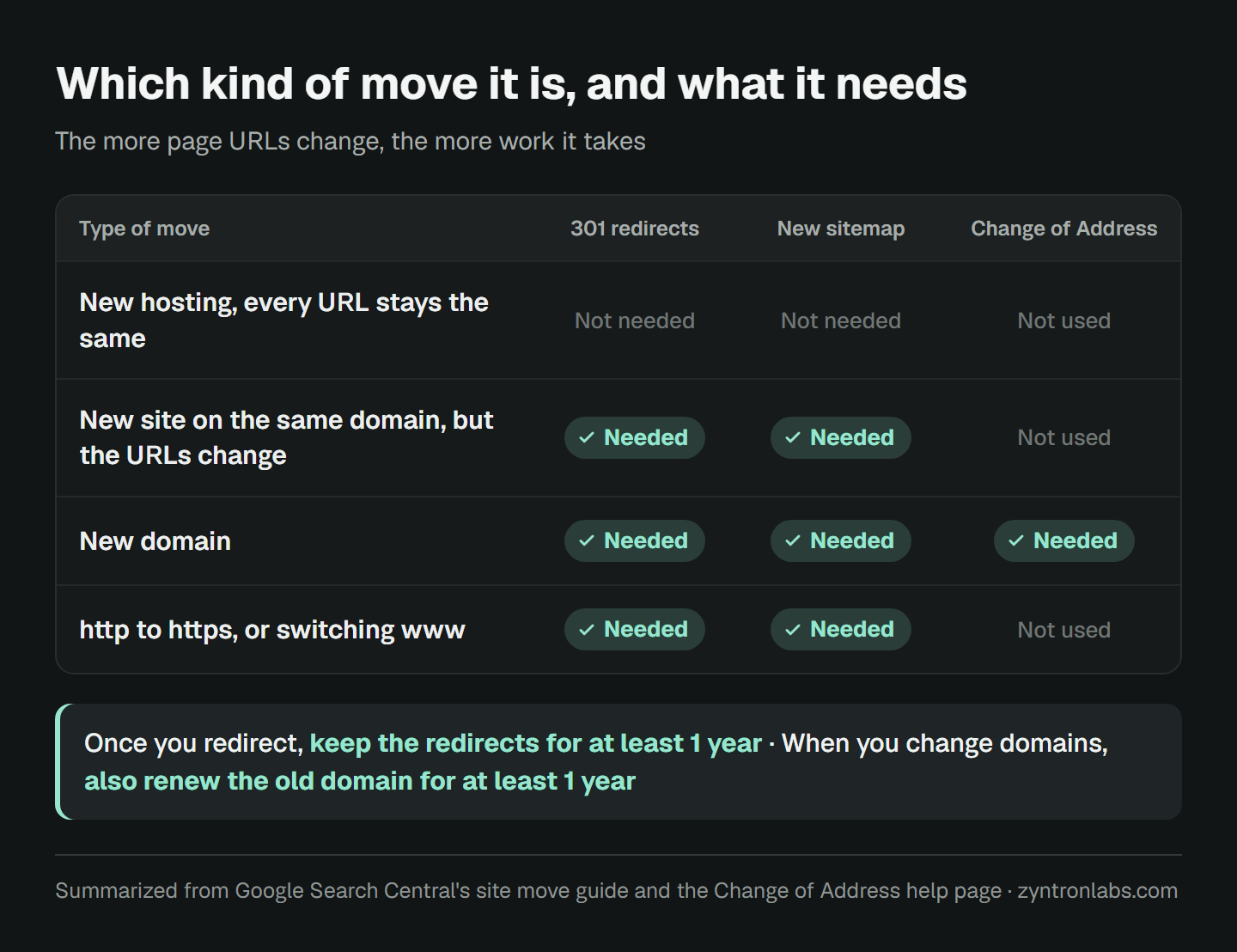
What kind of move it is decides how much work it takes
- New hosting, every URL stays the same: no redirects are needed, because no page has changed its address.
- New site on the same domain, but the page URLs change: every old page needs a 301 redirect to its new page, and you submit a new sitemap.
- New domain: 301 redirects for every page as well, plus telling Google with the Change of Address tool in Search Console.
- Moving from http to https, or switching www: use normal redirects. Google's guide says plainly that the Change of Address tool is not for this.
If you have the choice, don't change everything at once. Google writes that if you move a site and also redesign its content and URL structure, you will probably see some traffic loss while Google relearns and reassesses each page. Move first, let it settle, then rework the content of the pages that rank. That is the safer order.
Before the move
List every old URL
The sitemap alone is not enough. Google's guide suggests four places to look: your sitemaps, the pages that get the most traffic in your analytics or server logs, the pages with links from other sites in the Links report in Search Console, and the list of pages in your content management system.
Record your numbers before you move
Save the search terms, rankings and clicks for each page from Search Console, and the sales for each page from your analytics. Without these numbers, you cannot tell after the move whether a drop came from the move or from something else.
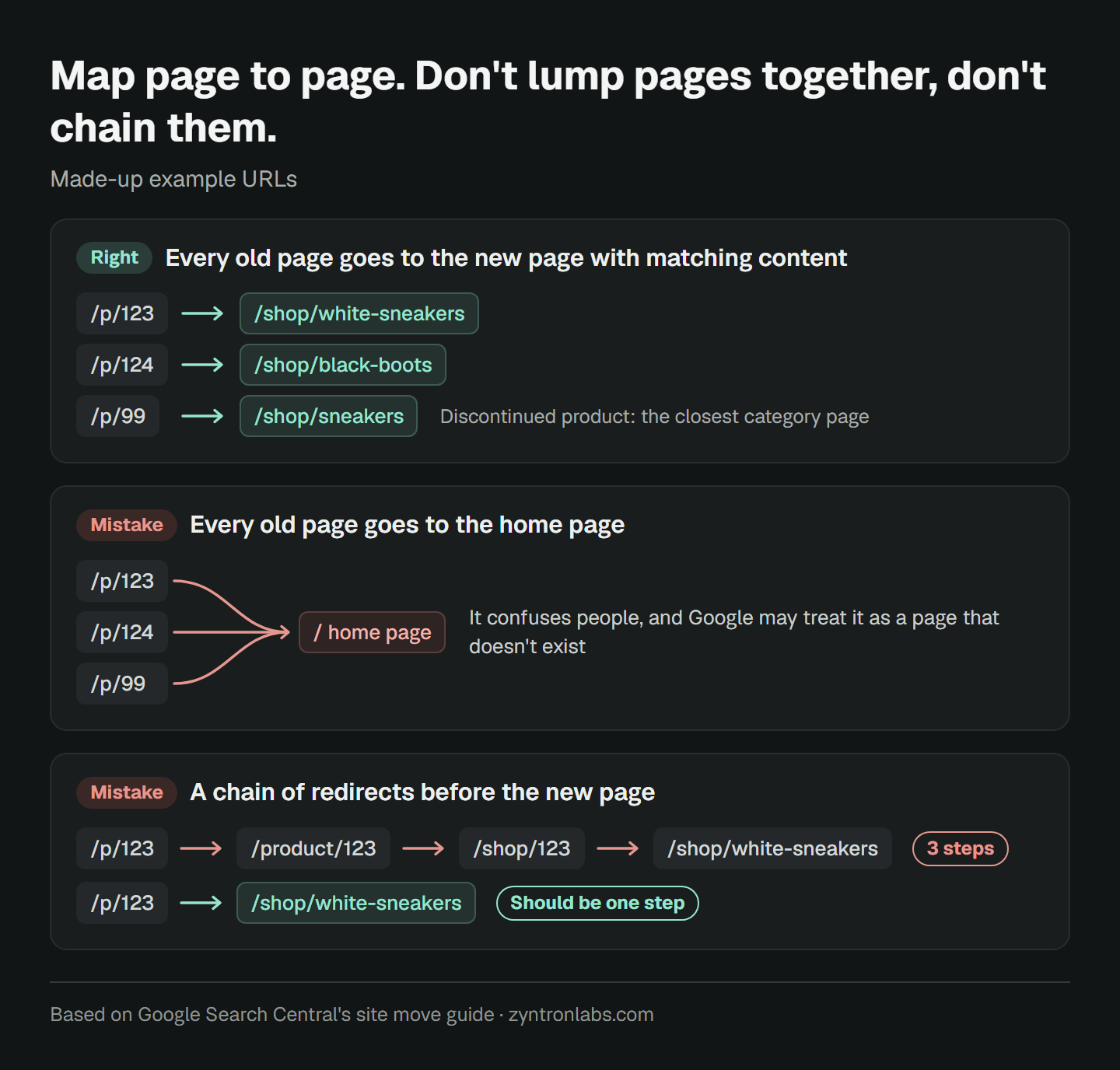
Map each old URL to a new URL, one page at a time
Every old page needs the destination closest to it in content. A product page for something you no longer sell should go to the closest category or brand page. Don't send every page to the home page. Google says this confuses people and may be treated as a page that doesn't exist.
Get the new site ready to let Google in
A new site under testing is often blocked from Google with robots.txt or a noindex rule. Write down every place it is blocked, so you can open all of them on moving day. If you are changing domains, verify both the old and the new domain in Search Console with the same Google account, because Change of Address only works for someone who owns both.
On moving day
- Turn on the 301 redirects from your map, so every old page goes straight to its new page in one step instead of a chain. Google can follow up to 10 steps, but advises no more than 3.
- Give every new page a canonical tag that points to its own address.
- Remove the noindex rules and robots.txt blocks you used during testing. Google's guide lists this as a common mistake.
- Submit the new sitemap in Search Console.
- If you are changing domains, use Change of Address once the redirects are in place.
- Check every URL in your map, to confirm it returns a 301 and lands on the right page.
After the move
- Be patient with the early numbers. Google writes that for a small to medium-sized website, most pages take a few weeks to move, and larger sites take longer. Rankings can go up and down in the meantime.
- Check Search Console every day in the first week, look for pages reported as not found, and add the redirects you missed.
- Keep the redirects for as long as possible. The site move guide says generally at least 1 year. With Change of Address, at least 180 days.
- Keep renewing the old domain for at least a year. Google recommends this so nobody else can buy the abandoned domain and use it for harm.
- Update the links outside your site that you control, such as your Google Business Profile, Facebook, LINE Official Account, your ads, and Google Merchant Center if you sell through the Shopping tab.
Five mistakes that really do lose rankings
- Shutting down the old site or letting the old domain expire, so every redirect disappears with it.
- Sending every old page to the new home page.
- Forgetting to remove the noindex rule added during testing.
- Rewriting the pages that rank on the same day as the move.
- Not recording any numbers before the move, so when traffic drops you can't find out why.
However well a move is done, rankings can shift for a while at first. Google says so itself. The goal of a move is to keep that period as short as possible, with no page lost for good.